My Own Website Got Flagged as Malware. Here's the Incident Response.
Overnight, someone looking at my site told me, half joking, that I was doing “drive-by attacks from my website”. Their security product had blocked one of my scripts as a dangerous page.
That’s a bad sentence to read about your own site, as a security person. This is the whole response, including the part where I got something wrong.

The block named one file: /_astro/LoadingTerm.astro_astro_type_script_index_0_lang.DIvnvwbE.js, with a threat name starting Heur.
Step 1: don’t panic, read the name
Heur. means a heuristic detection. It isn’t a signature for a known malware family. The engine saw something that looks like malware and made a guess. That changes the first question from “what infected me?” to “what did it see?”
Step 2: read the file
The flagged file is the script behind my hero terminal, the thing in the top-left that types a command and fills a loading bar. About 11.5 KB of its 12.5 KB was one giant string: roughly 240 lines of DFIR and PowerShell commands, written by me, to look cool.
The code after the string was 1,016 bytes. It splits the string, picks a random line, and writes it into the page one character at a time.
I then counted the dangerous primitives across the whole file. Every one was zero:
fetch,XMLHttpRequest,WebSocket,sendBeacon,import()eval,Function(,atob,btoainnerHTML,document.write,createElement,<scriptcookie,localStorage,location
The only DOM write was textContent, which can’t execute anything. The single https:// in the file was inside display text (curl -I https://target). It was never requested.
Step 3: check the deployed copy matches
Reading my local build proves nothing about what was actually served, so I downloaded the live file and compared hashes:
2e041afc3e60e6aa25828cd599e30a4778a80f26b6ceca6fde7e717d9836218d  dist/.../LoadingTerm...DIvnvwbE.js
2e041afc3e60e6aa25828cd599e30a4778a80f26b6ceca6fde7e717d9836218d  live copy from the site
Byte-for-byte identical. Nobody had modified it between my build and the visitor.
Why it probably got flagged
I can’t see the vendor’s rule, so this part is my best explanation, not a fact. The file contained a dense list of attacker tooling strings (FromBase64String, Invoke-Expression, certutil, vssadmin, malfind, searchsploit) next to a loop that writes text into a page. To a heuristic engine that can look a lot like a script staging commands. To a human reading the code, it’s a screensaver.
While I was there: npm audit
I’d run npm audit mostly to rule out a compromised dependency. It reported 10 vulnerabilities (1 critical, 7 high) in Astro, the Cloudflare adapter, undici, ws and sharp.
These were genuine, fix-them-now vulnerabilities: XSS, denial of service, request smuggling and similar. They were not malicious or compromised packages. I’ll come back to why that distinction matters.
I fixed them with npm audit fix --force, which jumped Astro 5 → 7 and the Cloudflare adapter 12 → 14.
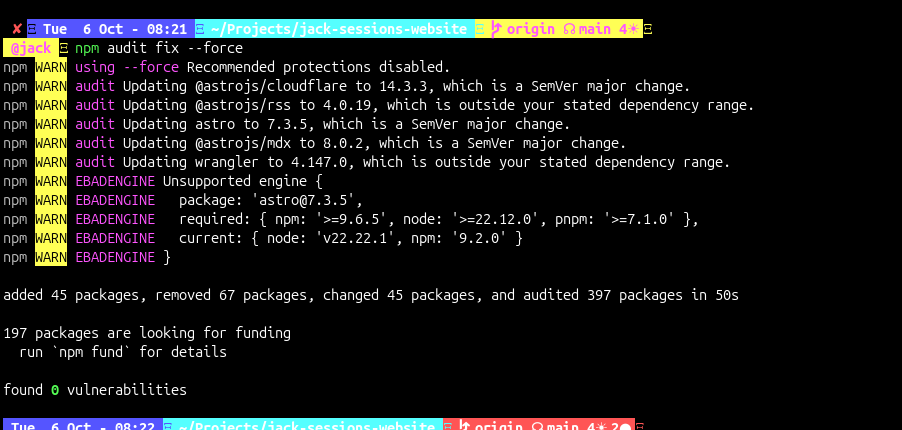
--force means “ignore your safety limits”, and the build promptly broke. Two fixes:
- The new adapter changed how the Worker entry point is declared in
wrangler.json. astro devcrashed at startup withMissing field moduleType, a known Astro 7 + Cloudflare dev-runtime bug. My site is fully static, so I load the adapter only forbuildand skip it in dev.
After that: build, tsc and a deploy dry-run all passed, and npm audit showed 0 vulnerabilities.
Step 4: remove the trigger
Whether or not the scanner is right, I don’t want a script full of attacker-tool strings in my bundle. I moved the command list out of the JavaScript. A tiny static endpoint now publishes it as /loading.json, and the script fetches it at runtime:
// src/pages/loading.json.ts
export const GET: APIRoute = () =>
  new Response(JSON.stringify(LOADING), {
    headers: { 'Content-Type': 'application/json' },
  });
The flagged file is no longer built, and the old URL now returns 404. The commands are still on the site, as data instead of code. I can’t promise a scanner won’t dislike the JSON, but it’s a much weaker pattern than a script.
The part I got wrong
When I first told my colleague what happened, I said two of my dependencies had been “popped in a supply chain attack.” I’d seen npm audit output, assumed the worst, and said it out loud before I’d checked anything.
It was wrong. The advisories were ordinary vulnerabilities, not malicious package versions. The flagged file was my own code. A vulnerable dependency and a compromised dependency are different incidents with different responses, and I blurred them under pressure. I’ve corrected it with them.
Lessons
- Read the detection name.
Heur.and a signature name are very different claims. - Read the artifact before theorising. Twenty minutes with the file beat any amount of guessing.
- Verify what’s actually deployed. Hash the live copy against your build.
- Know your severity words. “Vulnerable” and “compromised” are not interchangeable. Don’t announce an attack before you’ve found one.
- Never
--forceblind. It fixed everything and broke the build in the same minute. - Strings are signals. A site that displays attacker tradecraft as decoration will get pattern-matched by tools that don’t know it’s decoration. Fair warning if you build one.
- Admit the wrong guess early. It costs less than defending it.
The false-positive report is going to the vendor with the file, the hash and the source. If you’re doing IR on a website of your own, I hope the process helps. If you’re writing a heuristic engine, I hope the screensaver doesn’t.